An AI email generator turns a one-line instruction into a finished, sendable email — subject line, greeting, body and sign-off. Instead of staring at an empty compose window, you describe the outcome you want and edit what comes back.
- 8
- Tones, from Formal to Direct
- 12
- Languages supported
- ~5s
- Typical time to a draft
- $0
- To start — no account
The basics
What is an AI email writer?
An AI email writer drafts email from a short description of your intent. You supply the facts — who it is for, what you need, any deadline — and the model handles structure, phrasing and register.
The useful distinction is between generating and replying. Generating starts from nothing: “ask Priya to review the Q3 deck by Friday”. Replying starts from a message you received, where the AI has to read the original, work out what is being asked, and answer it. MailRewrite does both on the same page.
Getting started
How to write an email with AI in three steps
Describe what the email needs to do
One line is enough. Include names, dates and any number that matters — the AI will not invent them, and it cannot guess them.
Set the tone, length and language
Formal for a client, Friendly for a teammate, Direct when a thread has gone on too long.
Generate, then edit before you send
You get a complete draft in seconds. Check the facts, make the opening sound like you, then copy it into your inbox.
Proof
See it in action
Three briefs and exactly what each returns. Note how little you have to type, and how much structure the model supplies.
Example 1 — the follow-up
Your brief
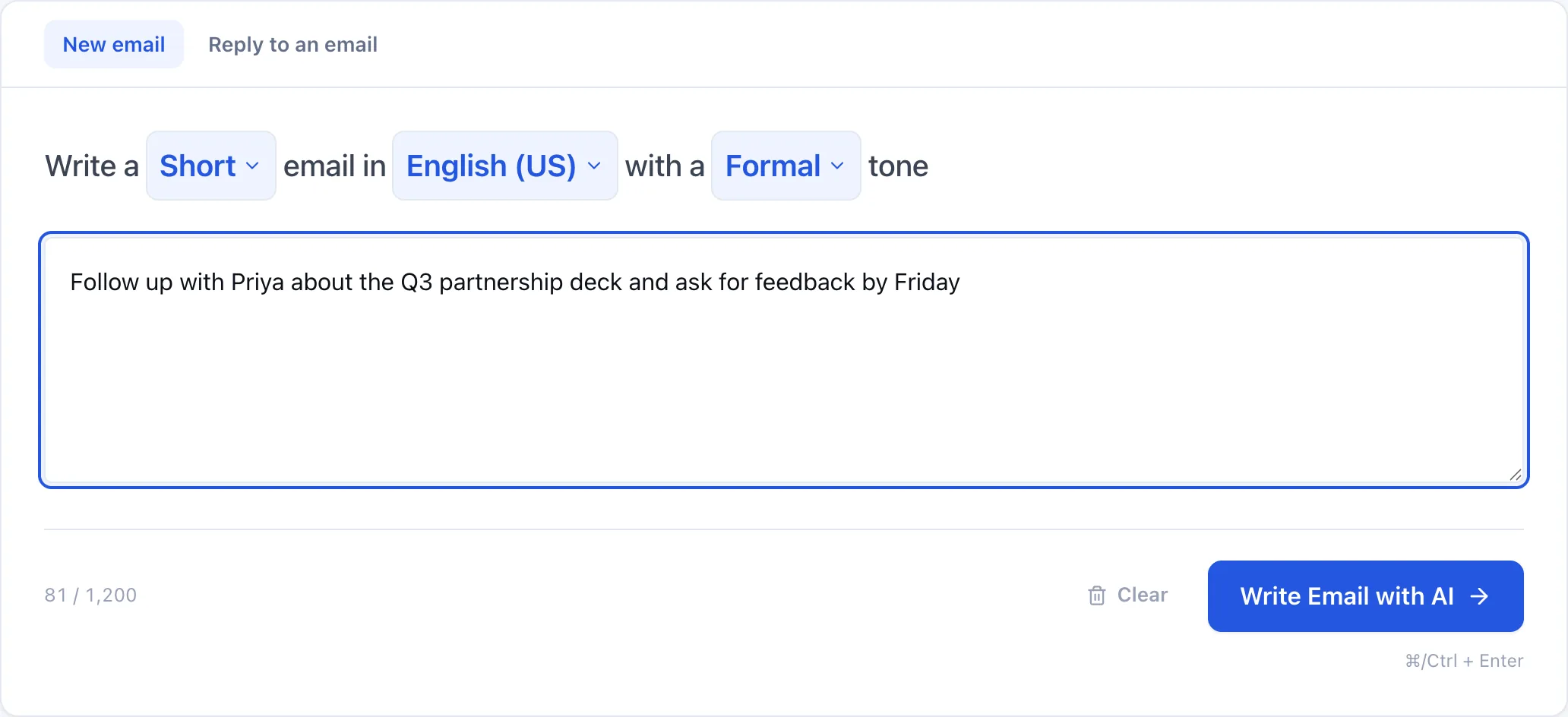
Follow up with Priya about the Q3 partnership deck, ask for feedback by Friday
Short · Formal · English (US)
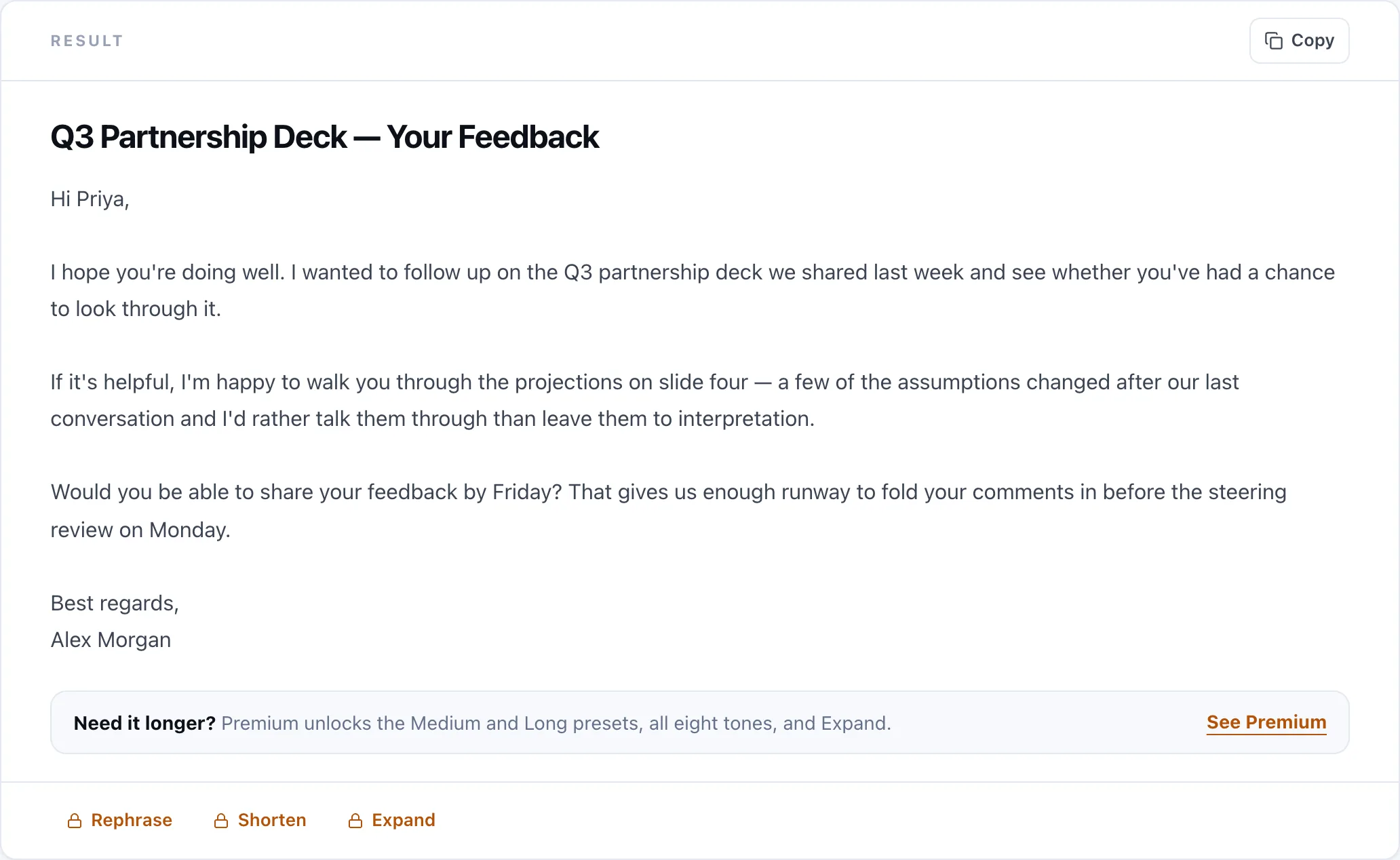
Q3 Partnership Deck — Your Feedback
Hi Priya, I wanted to follow up on the Q3 partnership deck we shared last week and check whether you have had a chance to look through it. Would you be able to send your feedback by Friday? That gives us time to fold your comments in before Monday's review. Thanks very much, Alex
Example 2 — the polite no
Your brief
Politely decline the vendor demo, we already signed with someone else
Short · Friendly · English (US)
Thanks — We've Gone Another Direction
Hi Marcus, Thanks for the follow-up, and for the time your team put into the proposal. We have decided to move forward with another provider for this project, so we will not be booking the demo. I appreciated how straightforward you were throughout. If anything changes on our side, I will be in touch. Best, Alex
Example 3 — the apology
Your brief
Apologise for missing the deadline, new date is next Wednesday, the delay was a data issue
Short · Apologetic · English (US)
Updated Timeline for the Migration Report
Hi Dana, I am sorry for missing Friday's deadline on the migration report. We hit a data quality issue in the export that took longer to resolve than expected. The revised delivery date is next Wednesday. I am confident in that date — the underlying problem is fixed and we are back on track. Apologies again for the delay. Alex
What Premium adds to the same brief
Free covers most everyday email. Premium changes two things that matter when the message carries weight: a stronger model, and room to use more than a hundred words. Here is the first brief above, run on both tiers, unedited.
One brief, both tiers
Follow up with Priya about the Q3 partnership deck, ask for feedback by Friday
Free
68 words
Short · Formal · English (US)
Q3 Partnership Deck — Your Feedback
Hi Priya, I wanted to follow up on the Q3 partnership deck we shared last week and check whether you have had a chance to look through it. Would you be able to send your feedback by Friday? That gives us time to fold your comments in before Monday's review. Thanks very much, Alex
Premium
116 words
Long · Formal · English (US)
Follow-Up on Q3 Partnership Deck
Dear Priya, I am following up regarding the Q3 partnership deck. I would appreciate the opportunity to understand your initial impressions and any feedback you may have on the materials. Your perspective will be valuable as we consider the next steps and ensure that the deck addresses the relevant priorities for the partnership. In particular, any comments on the overall approach, key messages, or areas that would benefit from further detail would be helpful. If possible, please share your feedback by Friday. This will allow us to review your input promptly and incorporate any necessary updates in a timely manner. Thank you for your time and consideration. I look forward to hearing your thoughts. Best regards, Alex
The free draft does the job in four lines. The Premium one says what kind of feedback would help, explains why the deadline exists, and closes properly — the difference between a note you send a colleague and one you send a partner.
Reference
Choosing a tone
Tone is the setting people get wrong most often.
| Use it for | Sounds like | |
|---|---|---|
| Formal | Clients, executives, first contact | Measured and complete |
| Friendly | Teammates, familiar contacts | Warm but professional |
| Casual | Close colleagues, internal mail | Relaxed, contractions, short |
| Confident | Proposals, pitches, negotiations | Direct, no hedging |
| Apologetic | Delays, mistakes, service issues | Accountable, not grovelling |
| Persuasive | Sales, fundraising, buy-in | Benefit-led, builds to an ask |
| Empathetic | Bad news, sensitive topics, HR | Acknowledges the reader first |
| Direct | Long threads, chasing, deadlines | Short sentences, one clear ask |
Comparison
AI email generator vs. a chatbot vs. templates
| This tool | General chatbot | Template pack | |
|---|---|---|---|
| Purpose-built for email | |||
| Subject line included | Sometimes | ||
| Adapts to your specifics | |||
| Reads and answers a received email | |||
| Tone and length as one-click settings | By prompting | ||
| No prompt engineering needed | |||
| Works without an account | |||
| Rewrite, shorten or expand a draft | By prompting |
A general chatbot can do all of this if you write a careful enough prompt. The difference is that here the prompt is already written — the tone, length and language settings are the prompt — so you type one line instead of five. Templates are faster still, but they cannot adapt to your situation, which is usually the part that matters.
In practice
What people use it for
Follow-ups and chasers
The email nobody wants to write. Chasing someone for the third time without sounding irritated is exactly what a tone setting is for.
Cold outreach
A first email to someone who does not know you, where structure and brevity decide whether it gets read.
Customer support
Consistent, calm answers to complaints and questions, at volume.
Declines and bad news
Turning down a vendor, a candidate or a request without burning the relationship.
Job applications
Cover emails that say something specific rather than repeating the CV.
Internal announcements
Policy changes and updates that need to be clear on one read.
Reply mode
Answering an email you received
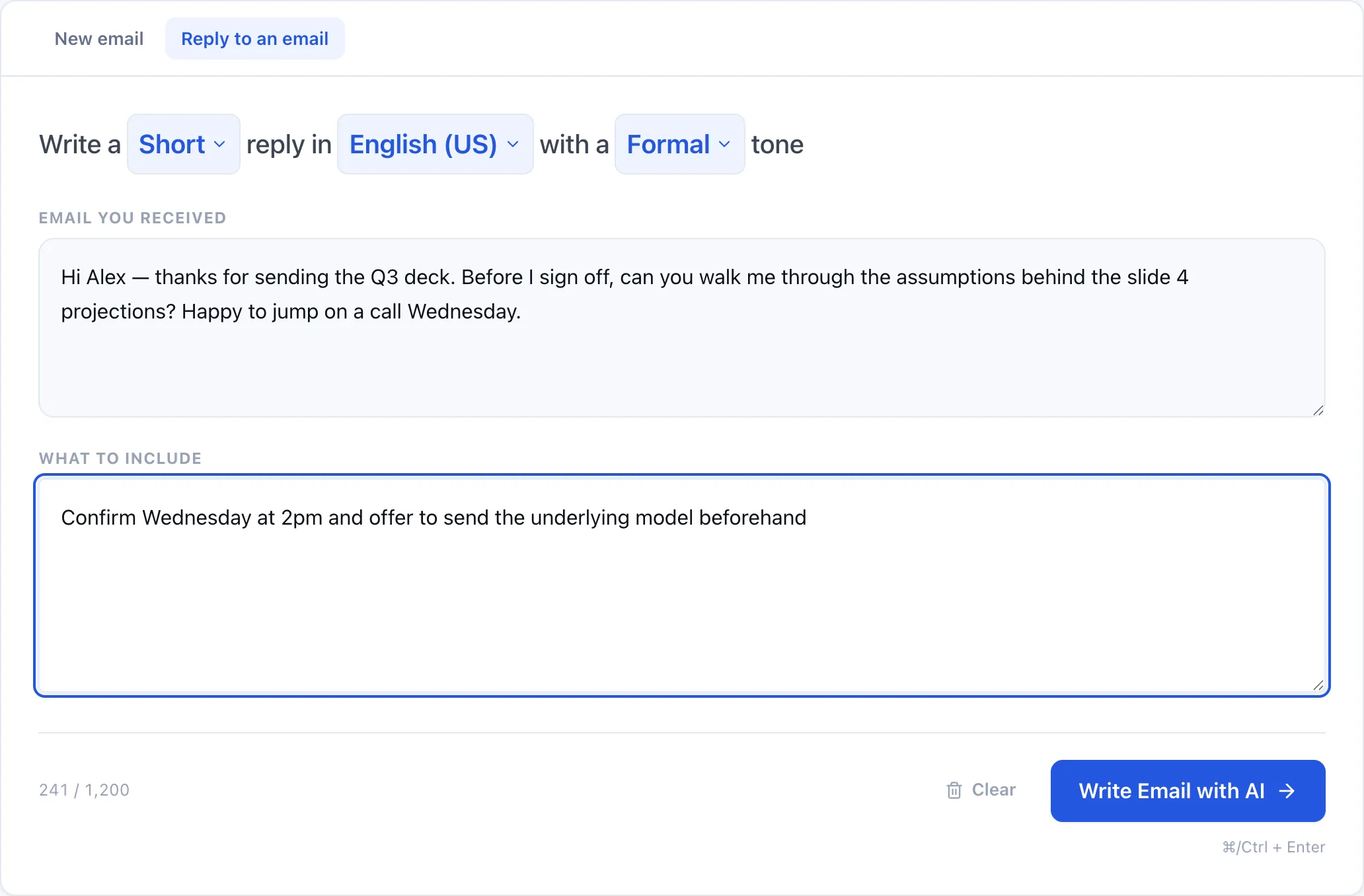
Paste the message you received, add a short instruction — “politely decline”, “confirm Wednesday at 2pm” — and the reply is written against the original’s context and tone.
Craft
How to stop AI email sounding like AI
Generated email has tells: every sentence the same length, no contractions, and transitions like “moreover” that nobody uses in an inbox. Four fixes:
- Rewrite the first sentence yourself. The opening is what the reader judges, and it is the easiest line to make sound like you.
- Cut one adjective per paragraph. Generated writing over-qualifies.
- Keep one short sentence. Uniform sentence length is the clearest giveaway.
- Delete any sentence that only restates the previous one.
Or let the AI Humanizer rewrite those patterns out, and the AI Detector show you sentence by sentence which lines still read as machine-written.
Pricing
What is free, and what is not
Free results are complete emails you can copy and send — not previews that stop halfway. What Premium sells is the longer version and the extras.
Free
- Complete, copyable Short and Medium emails
- 20 emails a day, no signup
- All 12 tones, 18 languages
- New and Reply modes
Premium
- Long output
- Our best AI model
- Expand, Shorten and Rephrase
- Much longer inputs
- The highest daily limit
The limits exist because every generation costs money to run. Capping the free tier is what keeps it genuinely free rather than free-until-we-turn-it-off.
More
Other free writing tools
AI Paraphraser
Rewrite any text in nine modes, with control over how much changes.
Grammar Checker
Fix grammar and spelling, and see every correction explained.
AI Humanizer
Rewrite AI-generated text so it reads like a person wrote it.
AI Detector
See how much of a passage reads as AI-written, sentence by sentence.
Frequently asked questions
Is the AI email writer free?
Yes — 20 complete emails a day with no account and no card. All 12 tones, 18 languages, and both Short and Medium length are included. Premium adds Long output, a stronger model, the Expand and Shorten actions, and far higher daily limits.
Do I get the full email for free, or just a preview?
The full email. Free results are complete drafts with a subject line and sign-off that you can copy straight into your inbox. Premium sells the longer version, not the missing half of a short one.
Do I need to sign up or give a card?
No signup, no login, no card. Open the page and start writing — your 20 daily emails reset at midnight UTC.
How do I write an email using AI?
Describe what the email needs to do in one line, pick a tone and length, and generate. Include names, dates and any figure that matters — the AI cannot guess those. Then edit the draft before you send it.
Can it reply to an email I received?
Yes. Switch to the Reply tab, paste the message you received, and add a short instruction such as 'politely decline' or 'confirm Wednesday at 2pm'. The reply is written against the original's context and tone.
What tones and lengths can I choose?
Twelve tones — Formal, Friendly, Casual, Confident, Apologetic, Persuasive, Empathetic, Direct, Enthusiastic, Diplomatic, Urgent and Encouraging — and three lengths. Every tone is free, and Short and Medium are both free. Premium adds the Long preset.
Which languages does it support?
Eighteen, including English (US and UK), Spanish, French, German, Portuguese, Italian, Dutch, Hindi, Arabic, Japanese, Chinese, Korean, Russian, Turkish, Polish, Swedish and Indonesian. It can also detect the language automatically.
How is this different from using ChatGPT?
A general chatbot can write email if you prompt it carefully. Here the prompt is already written — tone, length and language are settings rather than instructions you have to phrase — so you type one line instead of five, and every result comes back with a subject line.
Will emails written with AI land in spam?
Spam filtering keys on sending reputation, authentication and recipient behaviour, not on whether a human typed the words. A well-written AI-assisted email from a healthy domain is treated like any other. Bulk unsolicited sending is what causes problems, whoever wrote it.
Can I use it for cold outreach and mass emails?
You can draft outreach with it, but do not send unsolicited bulk mail. Beyond the deliverability damage, it likely breaches GDPR, CAN-SPAM or your local equivalent. Use it to write a good first email to someone you have a genuine reason to contact.
Should I use it for sensitive or legal emails?
Use it for the first draft, never the final word. Anything with legal, financial, medical or HR consequences needs a human — ideally a qualified one — to review it before it goes out.
Does the AI check its facts?
No. It writes well-formed email from what you give it. It does not verify claims and it will not know a detail you left out, so check every name, date and number before sending.
Do you store the emails I write?
No. We do not store the text you paste in or the emails we generate. We keep anonymous counts only, so we can enforce daily limits and detect abuse.
Does it work on a phone?
Yes. The tool works in any modern mobile browser, so you can draft a reply from your phone without installing anything.
Can I edit the result?
Yes, and you should. Copy it into your inbox and adjust it. Premium can also Rephrase, Shorten or Expand the draft in place without rewriting your brief.